RE 5: Structs
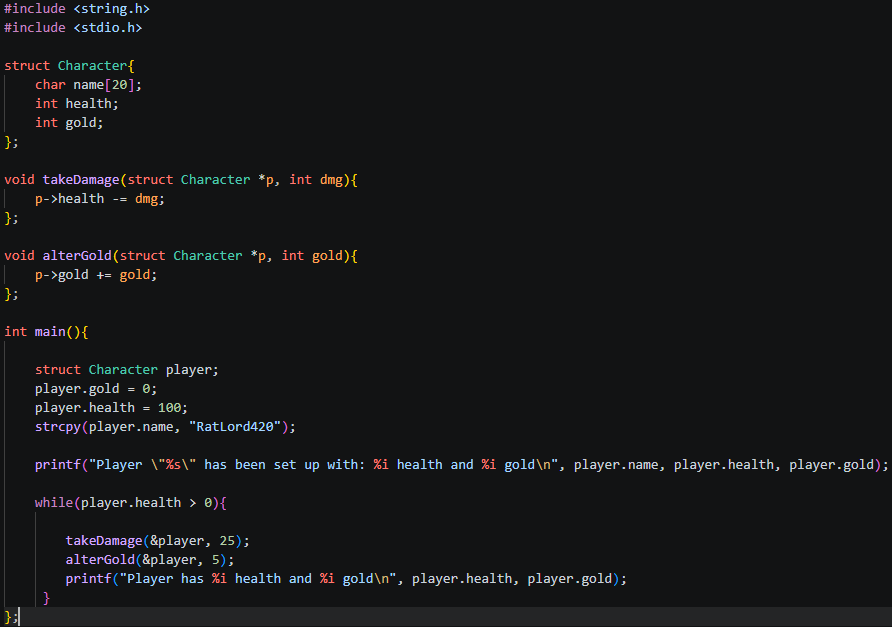
Our code:
IDA:
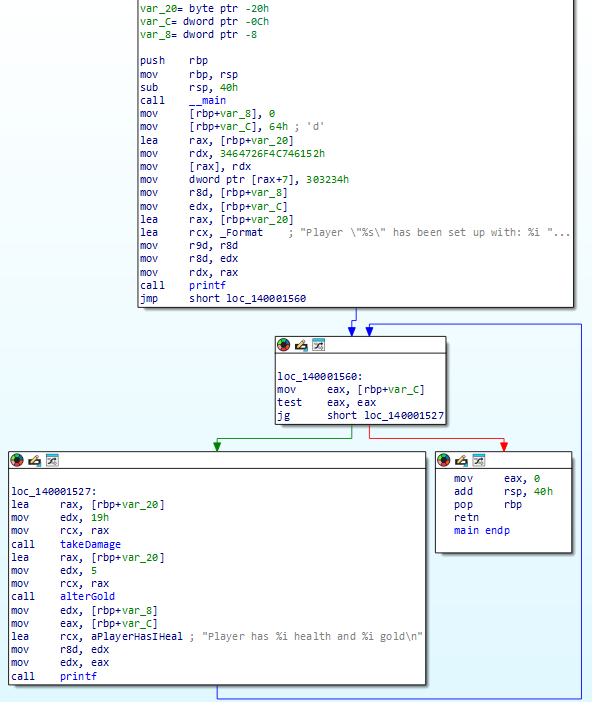
Lets talk a little bit more about setting up a struct and allocating space for its variables!
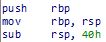 Taking it right back to the start, RBP! The Base Pointer (aka frame pointer) this is an address which remembers where the start of the program is. Once we’ve set up our new base pointer for our .exe we then allocate all the space we need to store our 3 player struct variables with: sub rsp 40h! remember that 40h means 40hex, not 40 decimal. To make this more clear I’ll use 0x notation to define hex numbers from now on. So 40h will be written as 0x40.
This 0x40 allocates 64 bytes of space (0x40 = 64 decimal - use your calculator to check!). The required amount of space is predetermined by the variables which are going to be defined, alongside something called shadow space, which reserves 32 bytes before any function call so the callee has somewhere to store its register values if needed. So we know we have 64 bytes total, 32 are accounted for by shadow space, leaving 32 bytes for our variables.
We can see that we have 3 variables:
Name:   byte  = 1 byte  at 0x20 (decimal 32)
Health: dword = 4 bytes at 0xC  (decimal 12)
Gold:   dword = 4 bytes at 0x8  (decimal 8)
Lets dive into how this works! Also, note here that how can the name be 1 byte? It takes 1 byte per character, and instead of referencing the whole string at this point, when called the characters are read one by one until they come across a null terminator ‘\0’, which defines when the ‘string’ ends. Interestingly this also means in a char[20] only 19 characters are usable, the last being the \0!
Ok now lets do some math. Our string is allocated for 20 characters at 1 byte (each character), and our health/gold as a dword (4 bytes)
-32 name[0] <- character 1
-31 name[1] <- character 2
...
-14 name[18] <- character 19
-13 name[19] <- last byte of name '\0'
-12 var_C    <- health starts here (0xC)
-8 Var_8     <- gold starts here (0x8)
-4 ???
So if we have 20 bytes for our string, 8 for our gold and health, what happened to the other 4 bytes to make up 32, we only used 28!? Well, this is called padding!
If you’ve noticed so far, all of the numbers we’ve dealt with are in 4s, 8s, 16s, 32s and 64s! This is because x64 requires the stack to always be 16-byte aligned, meaning the total space allocated must be divisible by 16. This is a hard rule of the calling convention, which is why the compiler rounds up to 64 bytes rather than using the exact amount needed which was 32 for shadow space and 28 for our variables (as 32+28 = 60! not 64). Remember we allocated 0x40 = 64!
At this point it is also worth mentioning that IDA helps us visualize our variables at the start of the program:
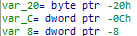 when in reality only space is allocated first, by ‘sub rsp 40h’, whatever bytes happened to be there from previous function calls are still sitting there, until we actually allocate values to these places in memory. if you look at your .s file you will not see anything other than the 64 bytes being allocated in preparation:
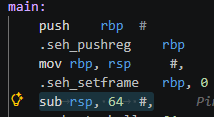 So to reiterate, IDA shows us those upfront, but this is not actually part of the flow. IDA does this to make things easier for our human brains to understand!
The actual values are allocated right after:
So to reiterate, IDA shows us those upfront, but this is not actually part of the flow. IDA does this to make things easier for our human brains to understand!
The actual values are allocated right after:
 (0x64 = 100 decimal, our initial health!)
Lets break down the following:
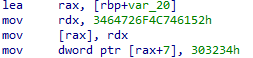
lea rax, [rbp+var_20]
load address of name[0] into rax (pointer to start of name array)
mov rdx, 3464726F4C746152h
; pack “ratlord4” into rdx as a single 8 byte little endian value
mov [rax], rdx
; write “ratlord4” into name[0] through name[7]
mov dword ptr [rax+7], 303234h
; write “420\0” starting at name[7], overlapping the ‘4’ and finishing with null terminator
Now we have all of our player variables set up!
Now we move into our loop:
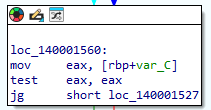 which is very much like the last one we went over, so we wont go into too much detail other than, we load our health into eax, run
 test eax eax, which sets 3 flags:
ZF (Zero Flag) — set to 1 if the result is 0, meaning health is exactly 0.
SF (Sign Flag) — set to 1 if the result is negative (the top bit is 1).
PF (Parity Flag) — set based on whether the number of 1 bits in the result is even or odd. Not relevant here.
jg then looks at both ZF and SF together — it jumps only if ZF is 0 (not zero) and SF is 0 (not negative), meaning the value must be strictly positive, just like it was defined in our c code.
In our code we defined our first void functions takeDamage and alterGold! In IDA we can see they are named functions!
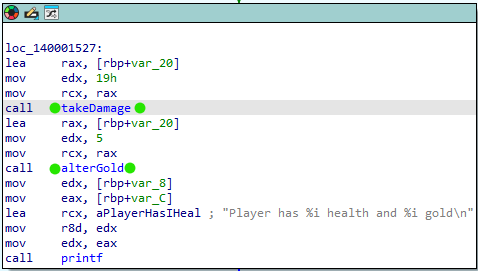
Lets double click on takeDamage and inspect what it does:
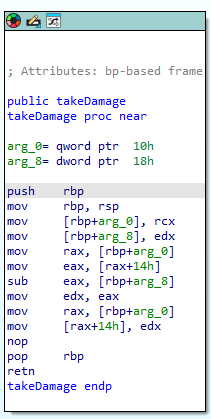
explain how the square brackets = pointers, just like how the actual takeDamage we set up takes pointers!!!
Now for some fun!
What happens if we mess with our variables in this loop?
Opening the .exe in x64dbg:
remember to do your pre-setup: This .exe will exit instantly once complete, to stop this: in x64dbg: click symbols tab, find kernel32, click it, find ExitProcess, then add breakpoint to it.
Next we can scan through the code…
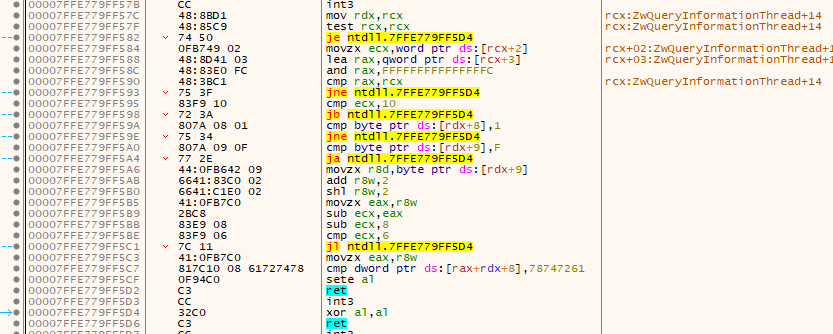
Hang on a minute, what is this? This looks nothing like what we were looking at in IDA! When you run an exe, Windows doesn’t just jump straight into your code, it runs a bunch of setup first. What we’re looking at here is code from ntdll.dll, a core Windows system library, which is responsible for things like loading dependencies and setting up exception handling before handing control to your program. You can tell by the ntdll. prefix in the addresses on the left.
to actually find our code, lets search for some strings we know the program uses, such as ‘player!’

double click on it to take us to:
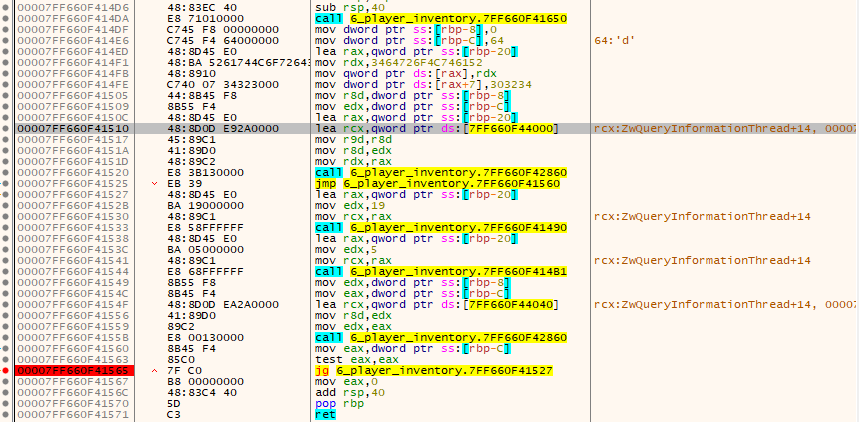
That looks much more familiar. And as we know our JG is a comparison we check before each loop iteration, lets add a breakpoint! now when we run the program hitting this breakpoint each time we can print out each iteration of the loop one by one.
Once we find where our subtractions to the health occur we can alter it!
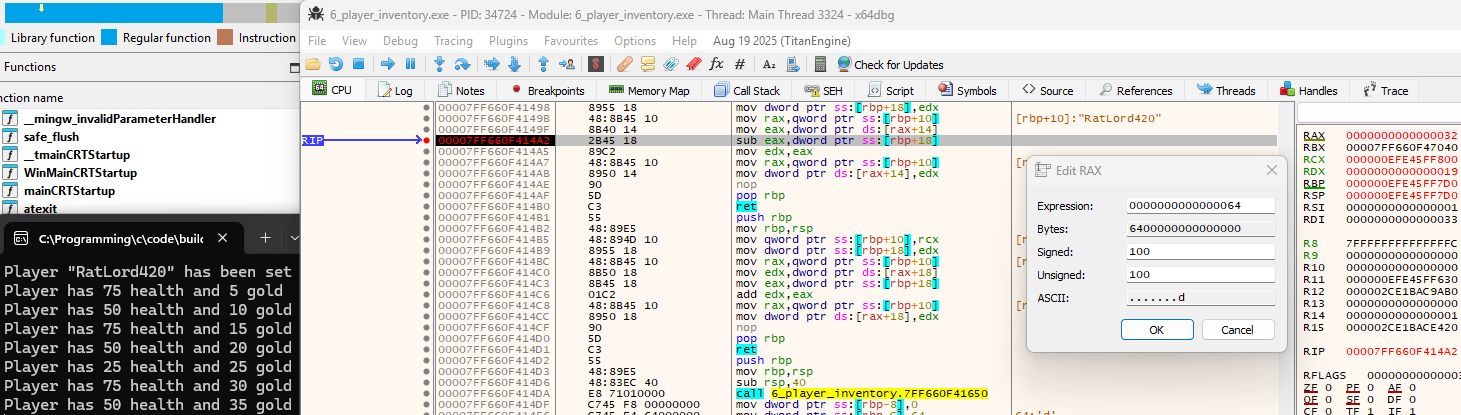 and make our loop do things it shouldn’t!
 You could also totally NOP out the subtraction instruction and be ‘invincible’.
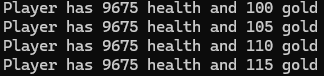
This may be only a simple example, but this essentially can work exactly the same in modern games!